A Cute Panda's Life Coloring Book Pages
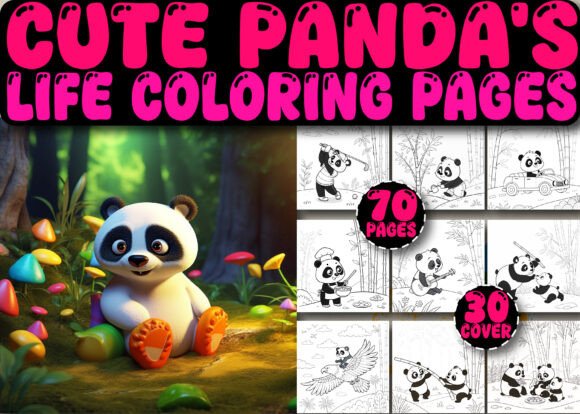
Coloring isn’t just for children—it’s a deliberate, low-friction creative practice that supports focus, stress reduction, and visual ideation. A Cute Panda's Life Coloring Book Pages is built for adults who value both aesthetic calm and practical utility: 70 original, high-resolution panda-themed illustrations designed specifically for creators, educators, and KDP publishers who need reliable, production-ready assets—not just inspiration.
This isn’t a generic clipart pack or a repurposed children’s book. Every page is crafted with adult coloring in mind: clean linework, balanced negative space, intentional detail variation (from gentle outlines to intricate bamboo textures), and consistent 8.5″ × 8.5″ proportions. That consistency matters—not as an aesthetic preference, but as a workflow requirement. When you’re batch-uploading 70 interior pages to Kindle Direct Publishing, uniform sizing, DPI, and file structure eliminate manual resizing, reformatting, and last-minute validation errors.
How It Fits Into Your KDP Workflow
If you’re building a high-content KDP coloring book, time spent on asset preparation directly impacts launch velocity and quality control. A Cute Panda's Life Coloring Book Pages reduces friction at three critical points:
- Pre-upload preparation: You receive 70 JPG, 70 PNG, and 70 SVG files—all at 300 DPI—plus one print-ready PDF and one EPS file. No conversion needed. No resolution guessing. You can drop JPGs directly into KDP’s interior uploader, use SVGs for vector-based edits (e.g., adjusting line weight or layering elements), and rely on the PDF for final layout verification.
- Cover design flexibility: The included 30 cover PNGs (also 300 DPI) aren’t decorative extras—they’re strategic assets. Each offers a distinct composition: some feature centered pandas with ample text-safe margins; others include subtle background motifs (bamboo, clouds, soft gradients) that work across multiple niches (mindfulness, animal lovers, kids’ learning). Because they’re resizable without quality loss, you can test thumbnail visibility at 150 × 230 px or scale up for paperback mockups—no pixelation, no re-rendering.
- Platform compliance: This interior has been fully tested on KDP’s live system. That means no unexpected cropping, no DPI warnings during upload, and no rejected previews due to bleed or margin issues. You’re not buying files—you’re buying validated compatibility.
Using the Files Beyond the Obvious
While the primary use case is KDP publishing, the file diversity opens secondary workflows—especially for creators managing multiple income streams or audience touchpoints.
SVG files, for example, integrate cleanly into Canva, Adobe Illustrator, or Cricut Design Space. An educator might extract a single panda outline and overlay it with vocabulary words for a bilingual flashcard set. A small business owner could import a bamboo-lined border SVG into a newsletter template to reinforce brand warmth before launching a mindfulness workshop series. The PNGs—with transparent backgrounds—allow easy compositing into social media posts, email headers, or printable classroom posters.
The JPGs serve as the most stable export for bulk processing. If you use Python scripts or Lightroom presets to batch-add subtle texture overlays (e.g., paper grain for vintage appeal), the uniform resolution and naming convention (panda_01.jpg through panda_70.jpg) let you automate without manual file sorting.
Integration With Your Existing Tools and Systems
You don’t need new software to use A Cute Panda's Life Coloring Book Pages. It works inside established ecosystems:
- Canva Pro users: Upload the PNGs or JPGs directly—no resizing required. Use the “Magic Resize” tool to generate Instagram carousels or Pinterest pins from a single coloring page, keeping your branding consistent across platforms.
- Adobe Creative Cloud: Import SVGs into Illustrator for precise line adjustments or into Photoshop for non-destructive color testing (e.g., simulating how warm vs. cool grayscale tones render on different e-ink devices).
- KDP + Publisher Rocket or Helium 10: Once your book is live, pair the title with targeted keywords like “panda coloring book for adults”, “mindful animal coloring”, or “KDP ready panda interior”. The specificity of the asset set—pandas only, no mixed animals—supports tighter keyword alignment and better category relevance.
Quality Control and Long-Term Usability
High DPI alone doesn’t guarantee usability—consistency does. Every image in this collection maintains identical stroke weight, corner radius, and spacing between elements. That predictability lets you plan multi-page spreads confidently: if page 12 uses a sitting panda with paws visible, page 47 won’t suddenly shift to a full-body walking pose with inconsistent limb proportion. Visual rhythm supports reader engagement—and reduces cognitive load during coloring.
Organization is embedded, not assumed. Files are numbered sequentially and named descriptively (e.g., panda_sleeping_bamboo_background.jpg). No need to rename or sort before uploading. For teams or agencies, that eliminates version confusion and streamlines handoffs between designers, editors, and upload specialists.
Long-term, the SVG and EPS formats future-proof your investment. As printing standards evolve—or if you later expand to Etsy printables, POD services like Printful, or even physical workshops—the vector files retain full editability. You’re not locked into a single platform or output method.
Practical Implementation Tips
Here’s how experienced KDP creators actually use this set—without overcomplicating things:
- Start with the PDF interior: Open it first to assess flow. Notice how themes progress—playful pandas early on, more detailed scenes (e.g., pandas climbing, eating, resting in nature) toward the middle, and simpler outlines near the end. This natural pacing helps readers build confidence. Use that sequence as your default unless you have a strong reason to reorder.
- Batch-test thumbnails: Before publishing, drag 5–7 JPGs into a folder, resize them to 150 × 150 px, and view them side-by-side. Do outlines remain legible? Does contrast hold? If fine details vanish, skip those pages for your first release and revisit them in a “deluxe edition” with enhanced line weight.
- Leverage the cover PNGs for A/B testing: Upload three different covers to KDP Draft simultaneously. Run them through a free tool like Publisher Rocket’s cover analyzer or manually compare click-through rates in your Amazon Ads dashboard after 7 days. Let real data—not gut feeling—guide your final selection.
- Repurpose one page per week: Share a single panda illustration on Instagram or Pinterest with a short caption about mindful coloring, panda conservation facts, or even a productivity tip (“This page took me 12 minutes—set a timer and protect that time like it’s client work”). One asset becomes recurring content, stretching your ROI beyond the book itself.
Finally, remember: the strength of A Cute Panda's Life Coloring Book Pages isn’t in its cuteness—it’s in its operational clarity. It removes guesswork so you can focus on what matters: positioning, audience connection, and consistent delivery. Whether you're launching your first KDP book or scaling a portfolio of 20+ titles, having 70 production-grade, platform-tested pages ready to deploy changes how you allocate attention—and that’s where real efficiency begins.