KDP Self Reflections Canva Template 6X9
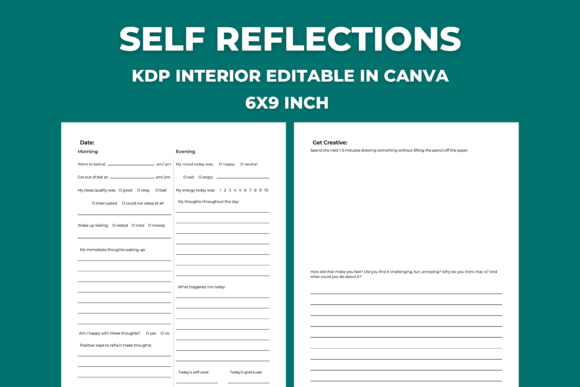
Looking for a simple, flexible way to design your own self-reflection journal for Kindle Direct Publishing? The KDP Self Reflections Canva Template 6X9 is a ready-to-customize 14-page interior layout built specifically for the standard 6×9 inch book size — the most popular format for journals on Amazon KDP.
This isn’t a finished book or a pre-written workbook. It’s a clean, minimalist Canva template — designed with only basic shapes, lines, squares, and tables — so you can personalize every page without wrestling with complex graphics or licensing restrictions. Whether you’re launching your first journal or adding a new title to an existing collection, this template gives you full creative control while saving hours of formatting time.
What’s Inside — And Why It Works
The template includes one page each for:
- Yearly goals (a focused space to clarify intentions for the year ahead)
- Monthly evaluation (to review progress, adjust plans, and reflect on wins and lessons)
- Monthly habit tracker (a simple grid-based layout to monitor consistency)
- Weekly self-care tracker (designed to encourage intentional rest, movement, and connection)
- Daily journaling page (with gentle prompts and open space for free writing)
- Nine unique reflection templates (covering topics like gratitude, growth moments, emotional awareness, decision-making, and personal values)
Each page is sized precisely at 6×9 inches with standard KDP margins and bleed settings already applied — so your interior stays print-ready when exported as PDF. There are no stock photos, watermarks, or premium fonts locked behind paywalls. Just editable text boxes and scalable vector elements that work seamlessly in Canva’s free or paid editor.
Who Benefits Most From This Template?
Beginners love it because there’s no design experience required. If you’ve ever typed a headline or moved a text box in Canva, you already have the skills needed. You don’t need to understand typography rules or CMYK color profiles — just your ideas, your voice, and a few minutes to tweak colors or fonts.
Professionals and entrepreneurs use it to build branded journals aligned with their coaching programs, courses, or content strategy. A freelance writer might add her signature tone and favorite quotes. A wellness coach could insert custom reflection questions tied to client outcomes. An educator may adapt the habit tracker for student goal-setting activities.
Bloggers and marketers appreciate how quickly they can spin up a companion journal for an eBook or email course — turning passive readers into active participants. Small business owners find it useful for team development kits or onboarding tools. Even hobbyists enjoy making personalized versions just for themselves — then deciding later whether to publish.
Real-Life Ways People Are Using It
A life coach created a “30-Day Clarity Journal” by renaming the monthly evaluation page as “Week-by-Week Insights,” adding her own reflection prompts to three of the nine templates, and using Canva’s brand kit to apply consistent colors and fonts across all pages.
A teacher adapted the daily journaling and weekly self-care pages into a “Mindful Learning Companion” for middle school students — swapping out abstract language for age-appropriate phrasing and including space for doodling next to each prompt.
A solopreneur building a digital product suite used the yearly goals and habit tracker pages as the foundation for a printable + KDP bundle — designing matching covers in Canva and offering both formats to meet different customer preferences.
How to Get Started — Step by Step
You’ll receive a ZIP file containing a short PDF with two things: a clickable link to open the Canva template directly, and clear, no-jargon instructions.
On Mac: Double-click the ZIP file — it unpacks automatically. Open the PDF and click the link.
On Windows: Right-click the ZIP file and select “Extract All.” Then open the PDF inside and follow the link.
If extraction doesn’t work, try a free online ZIP extractor — no download or sign-up needed.
Once in Canva, you’ll see all 14 pages in order. Edit any text, change colors, swap fonts, resize tables, or rearrange sections — everything is fully editable. When you’re done, export as PDF (select “Print” settings, not “Presentation”) and upload straight to KDP.
Important Things to Keep in Mind
You’ll need a Canva account — the free plan works perfectly for this template. No Pro subscription is required unless you want access to certain premium fonts or advanced background tools (which aren’t needed here).
Since this is a template — not a finished product — your voice, structure, and purpose drive the final result. That means taking time to think about who your reader is and what kind of reflection experience you want to offer. Don’t rush the customization step; clarity here makes publishing smoother later.
Also remember: KDP requires PDFs with embedded fonts and correct dimensions. Canva handles font embedding automatically when exporting via “File > Download > PDF Print.” Just avoid choosing “PDF Standard” — that version strips formatting.
Lastly, while the template uses only basic shapes and tables, double-check spacing on pages with tables (like the habit tracker) after editing text. Long words or extra lines can shift cell alignment — a quick drag-and-drop fix in Canva solves it instantly.
A Practical Tool With Room to Grow
The KDP Self Reflections Canva Template 6X9 stands out because it balances simplicity with real utility. It doesn’t overload you with features you won’t use — yet it provides enough variety (goals, habits, care, daily writing, deep reflections) to support meaningful growth over time.
It’s also future-proof. As your audience evolves or your focus shifts — from mindfulness to productivity, from solo practice to group facilitation — you can duplicate pages, combine layouts, or create new versions without starting from scratch.
Most importantly, it puts *you* in charge. Not algorithms, not trends, not rigid systems — just thoughtful structure, designed to hold your ideas, your process, and your perspective — in a format people actually choose to hold in their hands.